New Loan (800) 710-7359
Need Assistance (800) 252-6950

Credit Score

Take control of your credit with free tools in Digital Banking.

When it comes to your credit, knowledge is power. Credit Score is available for free to all CU1 members through Digital Banking, and it is more than just a way to track your score—it offers resources and tools to help you understand what your score means and how you can take the right steps to improve or maintain it.

Through Credit Score, you have access to:

Using the Credit Score tools has no impact on your score, and it is simple to get started. Log in to Digital Banking and access Credit Score through your personalized dashboard.

Credit Score
Credit Score Analysis

Credit Score Analysis

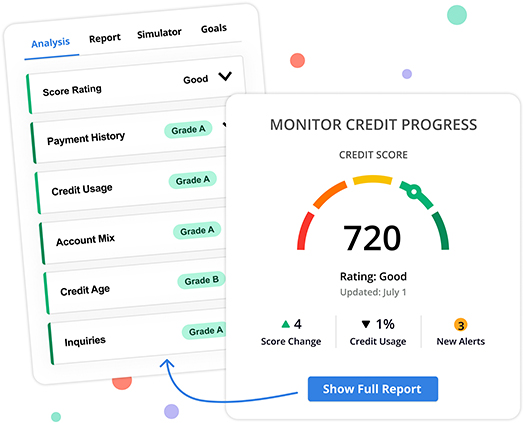
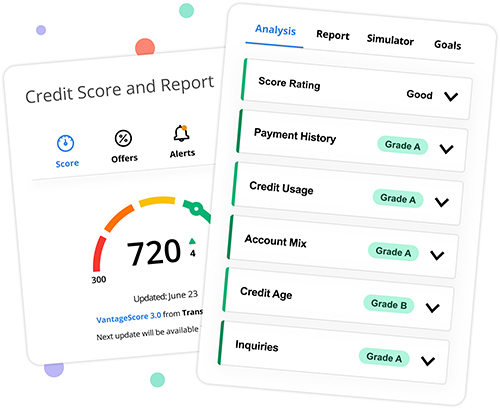
Understand what goes into your credit score and where you can improve with Credit Score Analysis. The analysis will grade your Score Rating, Payment History, Credit Usage, Account Mix, Credit Age, and Inquiries to help you better understand what is currently impacting your credit score and if there are areas where you can take steps to make improvements.

How to Access this Feature:
On the Credit Score and Report home screen, scroll until you see "Analysis." From there, you will see individual tabs and scores for each component of the analysis. Click on the arrow to expand each section.

Credit Score Goals

Credit Score Goals

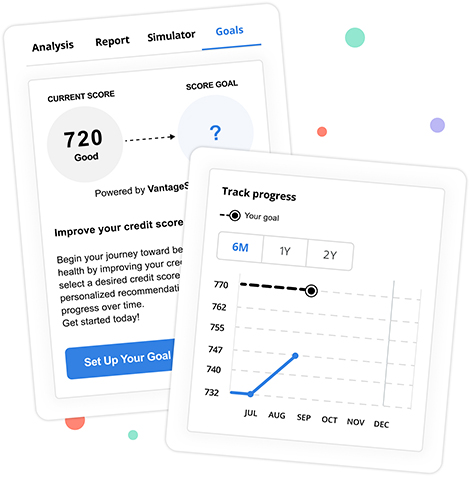
Looking to improve your credit score? With the Credit Score Goals feature, you can set a credit score goal and desired timeframe to make those improvements. The Credit Score Goals tool will send recommendations on how you can improve your score, help you track your progress, and send regular updates on goal completion. Credit Score Goals can help you make strides toward your next financial milestone.

How to Access this Feature:
On the Credit Score and Report home screen, scroll until you see "Goals." Click the Goals tab to access the tool, and set up your score by selecting "Set Up Your Goal."

Credit Score Simulator

Credit Score Simulator

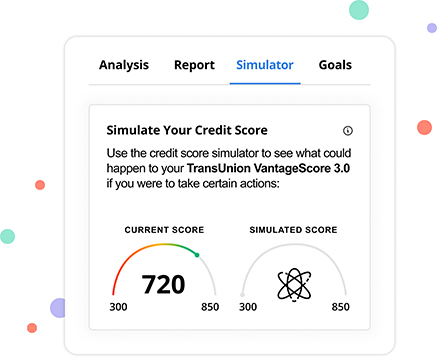
The Credit Score Simulator will help you see how certain hypothetical financial actions might impact your score. See if your score will go up or down if you apply for a new loan or credit card, pay down or off your credit card balances, or make on-time or late payments for an extended period of time.

How to Access this Feature:
On the Credit Score and Report home screen, scroll until you see “Simulator.” You will need to click Simulator to access this tool.

Credit Score Alerts

Credit Score Alerts

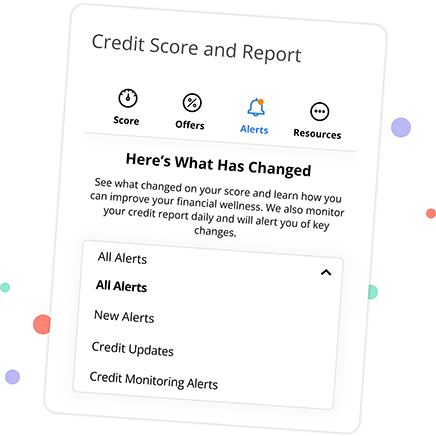
Receive email and in-app alerts to let you know what has changed on your credit report. Understand what has changed on your score and learn how you can improve your financial wellness. Get Credit Updates, Credit Monitoring Alerts, and more.

How to Access this Feature:
On the Credit Score and Report home screen, select the Alerts icon above your credit score. Once you click Alerts, you will automatically receive a summary of any recent or past alerts pertaining to your credit score.

How Do I Start Building Credit?

If you want to qualify for a loan to buy a house, a car, or another expensive product or experience, you need credit. The world of credit, credit reports, and credit scores can seem intimidating—especially if you are just starting out—but you can start building credit right now and work towards funding your financial dreams with these tips.

Read More

What is a Credit Report?

Your credit report tells you and potential lenders about your financial health—including your debts and their payment history—and can mean the difference between your loan or credit card application being accepted or declined.

Read More

How Your Credit Score Affects a Car Purchase

It’s no secret your credit score is important. But many are surprised how great a role it can play in the overall cost of an auto loan. When financing a vehicle, your credit score matters in terms of getting approval for a car loan, the amount you will need for a down payment, and the total interest you will pay over the life of your auto loan.

Read More

Frequently Asked Questions

  • Credit Score and More helps you stay on top of your credit by providing your latest credit score and report and understanding key factors that impact the score. It also monitors your credit daily and informs you by email if any significant changes are detected, such as a new account being opened, a change in address, employment, delinquency, or inquiry has been reported.

  • Credit Score and More is a "soft inquiry" which does not affect a credit score. Lenders use "hard inquires" to make decisions about creditworthiness when you apply for loans.

  • The credit score will be updated every seven days and displayed in mobile and online banking. You can click "refresh score" as often as every day for an updated credit score.

  • Credit Score and More shows the most relevant information from a credit report. If you think some information is wrong or inaccurate, you can obtain a free credit report from www.annualcreditreport.com and then dispute inaccuracies with each bureau individually. Each bureau has its process for correcting inaccurate information, but every Credit Union 1 Financial Credit Score and More user can "File a Dispute" with Transunion by clicking on the "Dispute" link within Credit Score and More. Transunion will share this with the other bureaus if the inaccuracy is verified.

  • Three major credit-reporting bureaus (Equifax, Experian, and Transunion) and two scoring models (FICO or VantageScore) determine credit scores. Financial institutions use different bureaus, as well as their own scoring models. Over 200 credit report factors may be considered when calculating a score, and each model may weigh credit factors differently, so no scoring model is identical.

  • Credit Union 1 uses its own lending criteria for making loan decisions.

  • Log in to Digital Banking. Locate the Credit Score module and click “Show Full Report”.

    How to set up:

    1. Credit Score Goals is located both below the Score Analysis Cards and under the “Credit Score Goals” tab on the Credit Score Dashboard.
    2. Clicking “Set Up A Goal” on the Dashboard directs users to the “Set up your goal” page. Here, users can choose their credit score goal and the timeframe for achieving it.
    3. After setting their credit score goal, users are directed to the goals page. Here, they can view their current score and score goal, track their progress toward reaching the goal, and receive recommendations for improving their score.
    4. Upon achieving their Credit Score Goal, users will receive an email notification confirming their success. In the Credit Score solution, they’ll be greeted with a congratulatory message and given the opportunity to set up a new goal if they wish.
CU1 Cares icon

Credit Union 1 is celebrating 67 years of helping individuals, families and communities reach their financial goals. Learn More

You are leaving Credit Union 1

You are leaving creditunion1.org and entering a website that Credit Union 1 does not control. Credit Union 1 has provided this link for your convenience, but does not endorse and is not responsible for the content, links, privacy policy, or security policy of or the propriety of any information on this website. Do you want to proceed?

Yes No