New Loan (800) 710-7359
Need Assistance (800) 252-6950

Make a Payment Manage Your CU1 Loan Your Way

Credit Union 1 makes it easy to stay on top of loan payments through multiple ways to pay—online, by mail, in person, or over the phone. Never miss a due date when you pick the payment method that is most convenient for you.

Log In to Digital Banking

Convenient Ways to Pay Your Loan

make a payment on mobile

Download the CU1 Mobile Banking App

app store icon   google play icon

4.45 stars

4.45 1,270 Ratings

Pay with CU1 Digital Banking

Make loan payments and view your loan details through CU1 Digital Banking. You can access your loan immediately once you register. Not registered for Digital Banking? Register now.


Pay Online with Your CU1 Account

You can make a loan payment with your CU1 Checking or Savings account directly through Digital and Mobile Banking.

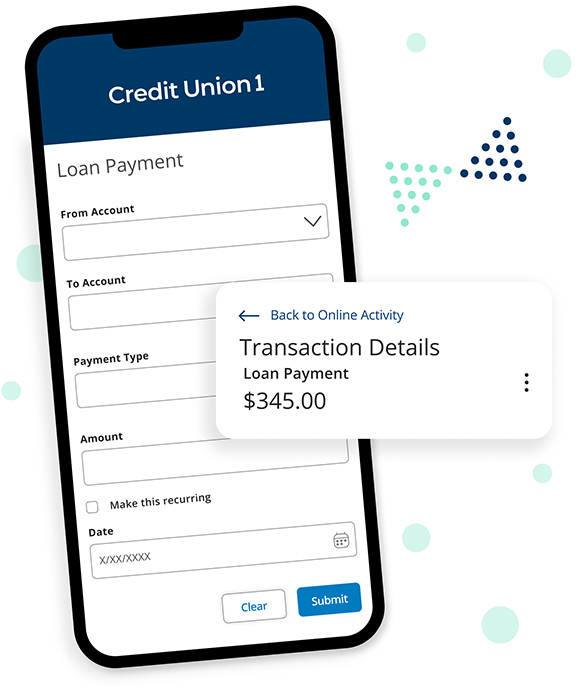
    1. First, log in to Digital Banking. Under the Menu, select Transactions and then Loan Payments.

    2. In the From field, choose the specific account/suffix you would like to withdraw funds from to make the payment.
    3. In the To field, choose the CU1 loan you would like to pay. The Loan Details will appear and show your current balance, due date, and next payment amount.
    4. Now, select the Payment Type. The most common payment options are Regular Payment, Other Amount, Principal Only Payment, Payoff, and Close Loan. You can only make Principal Only payments from a CU1 account.
    5. Type in the payment amount. Based on the payment type selected, the payment amount may pre-fill, but you can also make changes as needed.
    6. You can check the checkbox to make your payment recurring and select the desired frequency of the recurring payment. If you only want to make a one-time payment, do not check this box.
    7. Click or tap ‘Submit’ to complete your request.

    If you would like to adjust a recurring payment, you can find it in the Activity Center. Select Transactions from under the Menu, followed by Activity Center and then Recurring.

Get Started


Make a Payment Online with an Account from Another Financial Institution

You can make a loan payment with an account from another financial institution within CU1 Digital Banking.

First, you will need to ensure your external account is linked. Credit Union 1 uses Plaid to seamlessly and instantly allow you to set up linked accounts. Read the full instructions for how to link an external account.

    1. Log in to CU1 Digital Banking. Under Menu, select Transactions then Loan Payments.
    2. In the From field, choose your external account (it will appear here if your external transfer account is properly linked).
    3. In the To field, choose the CU1 loan you would like to pay. The Loan Details will appear and show your current balance, due date, and next payment amount.
    4. Now, select the Payment Type. The most common payment options are Regular Payment, Other Amount, Payoff, and Close Loan. To make a Principal Only payment, you will need to use your CU1 Checking or Savings account. You can make a transfer from your external account to CU1 Checking or Savings, then make your Principal Only payment using the steps above.
    5. Type in the payment amount. Based on the payment type selected, the payment amount may pre-fill, but you can also make changes as needed.
    6. You can check the checkbox to make your payment recurring and select the desired frequency of the recurring payment. If you only want to make a one-time payment, do not check this box.
    7. Click or tap ‘Submit’ to complete your request.

Get Started

Other Ways to Pay


Automated Payment Authorization Form

Log in to your CU1 account to securely submit the ACH form. Once complete, a monthly recurring payment will be withdrawn on the same day.

In Person

Make a loan payment in-person at a branch near you. 

Find a Location

Skip-a-Pay

Could you use a break from your loan payment? As a valued CU1 member, you may be eligible to skip a payment, freeing up cash when you need it.1

Learn More

By Mail

Send your loan payment by mail to:

Credit Union 1
Attn: Payment Servicing
2651 Paseo Verde Parkway
Henderson, NV 89074

You can also make a payment by calling (800) 252-6950, available Monday through Friday, from 9:00am to 6:00pm CST.

Loan Payoff Quote

Request a Loan Payoff Quote Online

You can now easily request a payoff quote for an Auto, Signature, or Share Secured loan through Digital Banking.

Learn More

Notices of Error and Requests for Information

Borrowers have certain rights under Federal law related to resolving errors and requesting information about their mortgage account. Notice of errors and requests for information must be directed to:

CU1 Mortgage Servicing Department
2651 Paseo Verde Pkwy.
Henderson, NV 89074

Your submission must be in writing and include borrower’s name, loan number, and a description of the error you believe has occurred OR a request for specific information regarding your mortgage loan.

CU1 Cares icon

Credit Union 1 is celebrating 67 years of helping individuals, families and communities reach their financial goals. Learn More

You are leaving Credit Union 1

You are leaving creditunion1.org and entering a website that Credit Union 1 does not control. Credit Union 1 has provided this link for your convenience, but does not endorse and is not responsible for the content, links, privacy policy, or security policy of or the propriety of any information on this website. Do you want to proceed?

Yes No